Self-initiated / Desktop / 2026

An operating system for agent-first companies: one feature, three altitudes, and an engineer who directs the agent in eight exact lines.

- Type
- Self-initiated project
- Sector
- Operations, enterprise software
- Platforms
- Desktop browser
- Services
- Strategy and research
- Product design
- Brand identity
- Design systems
- Development
The person and the agent
The agents do the work and every person owns decisions at their own altitude. At an invented SaaS company, the CPO asks for one feature, offline photo capture on job cards. She decides the date, the engineering manager gives the build an owner, and a senior engineer writes the exact direction the Sync agent builds from: design, code and configuration, in eight lines. The agent reads it back before it writes a line.
A self-initiated project: no client, not launched, no users or results. Every person, company and figure in the screens is invented.
01 / Strategy and research
Direction is the engineer’s most important decision. So we made it an object.
The question
If agents already write the specs, the code and the tests, what is left for each person in a product company to do? Microsoft’s 2025 Work Trend Index talks about people becoming “agent bosses”. Coding agents now take an issue and open a pull request. But they are briefed with a prompt in a chat box and reviewed afterwards, so the engineer’s real intent (which states, which data model, what not to touch, which limits) is never written down.
The insight
In an agent-first company everyone decides, at a different altitude. The executive decides direction, the manager unblocks and connects teams, and the engineer’s most important decision is the direction they give the agent that builds. So direction is a first-class object: short, exact, split into Design, Code and Config, read back by the agent before execution, and cited by every part of the result.
The model
A Strategy (here, one feature) resolves into a Cluster of Moves and Calls. A decision that crosses teams becomes a Link. Roles are people (photos in circles) or agents (coded squares). Tools are Sources the OS reads, never windows you open.
Trade-offs
A tagged, eight-line direction rather than a twenty-field form. Read-back before execution rather than review after. One home layout for every role, so the three can be compared. Homes rather than widget dashboards. Not designed: agent setup, permissions, mobile.

02 / Product design
One feature, ten screens, three people.
Saskia is CPO at Tallyard, an invented software company for field-service teams. Technicians lose photos when they have no signal, and 41 support tickets say so. Every screen answers three things: what you need to know, the one thing to do, and the one fact that makes it easier.
The UI rule, on one screen: the engineer’s read-back
Know
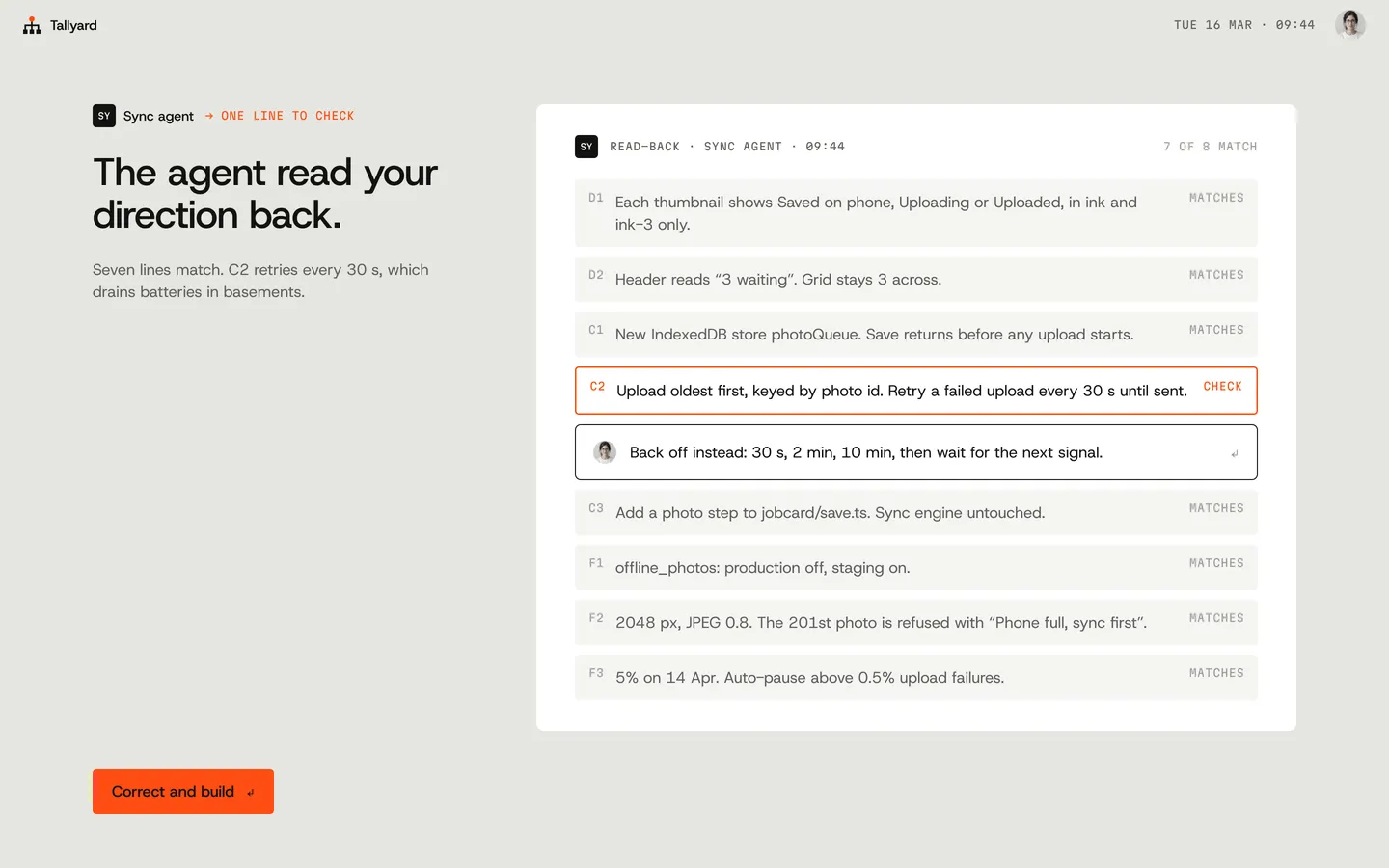
Seven lines match. C2 would retry every 30 s and drain batteries in basements.
Do
Correct and build.
Eases
The correction is one sentence, and the agent restates every line before it writes one.


Desktop / 10 screens
01 / 10
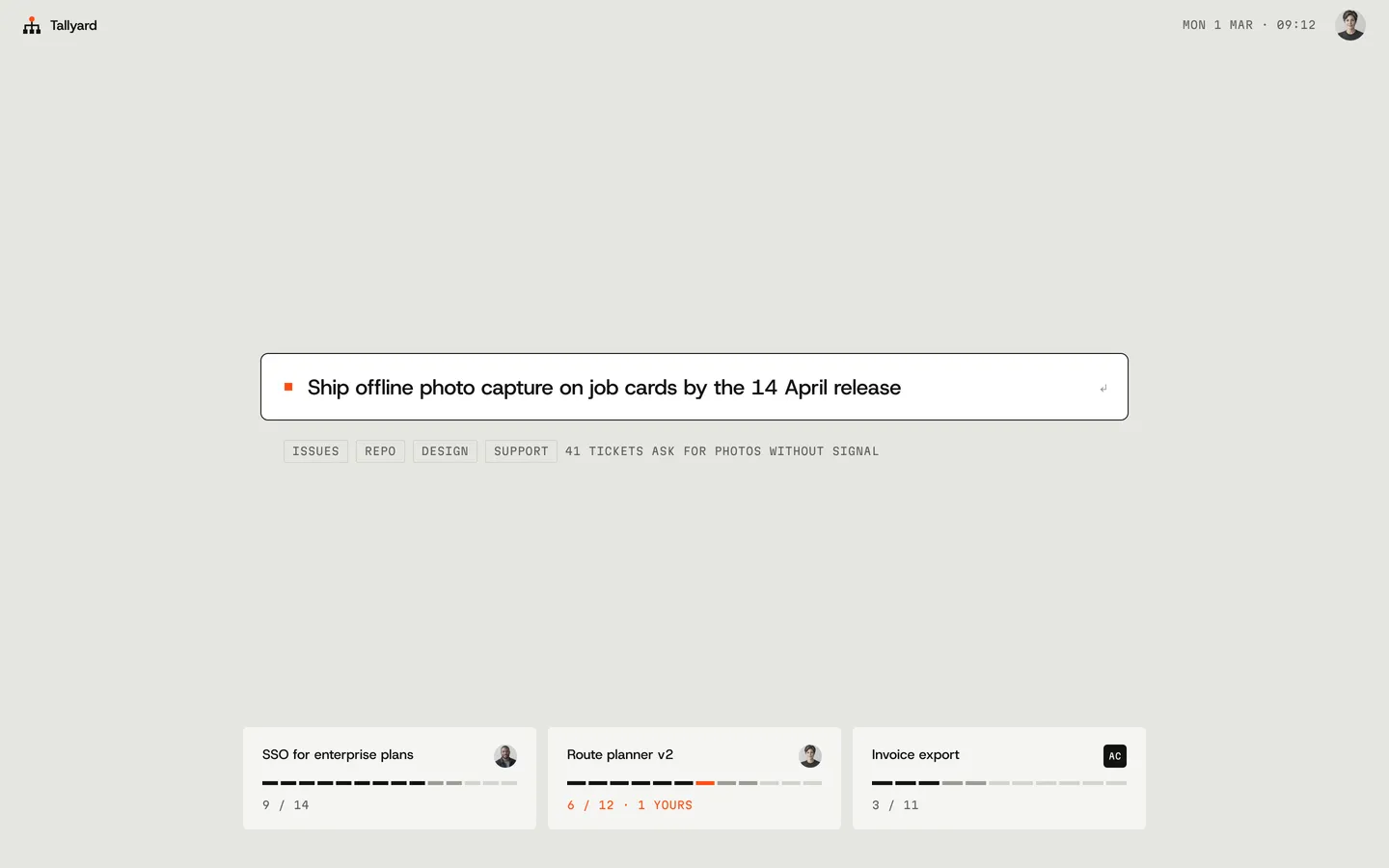
Now
Saskia asks for one feature: offline photo capture on job cards by the 14 April release.
02 / 10
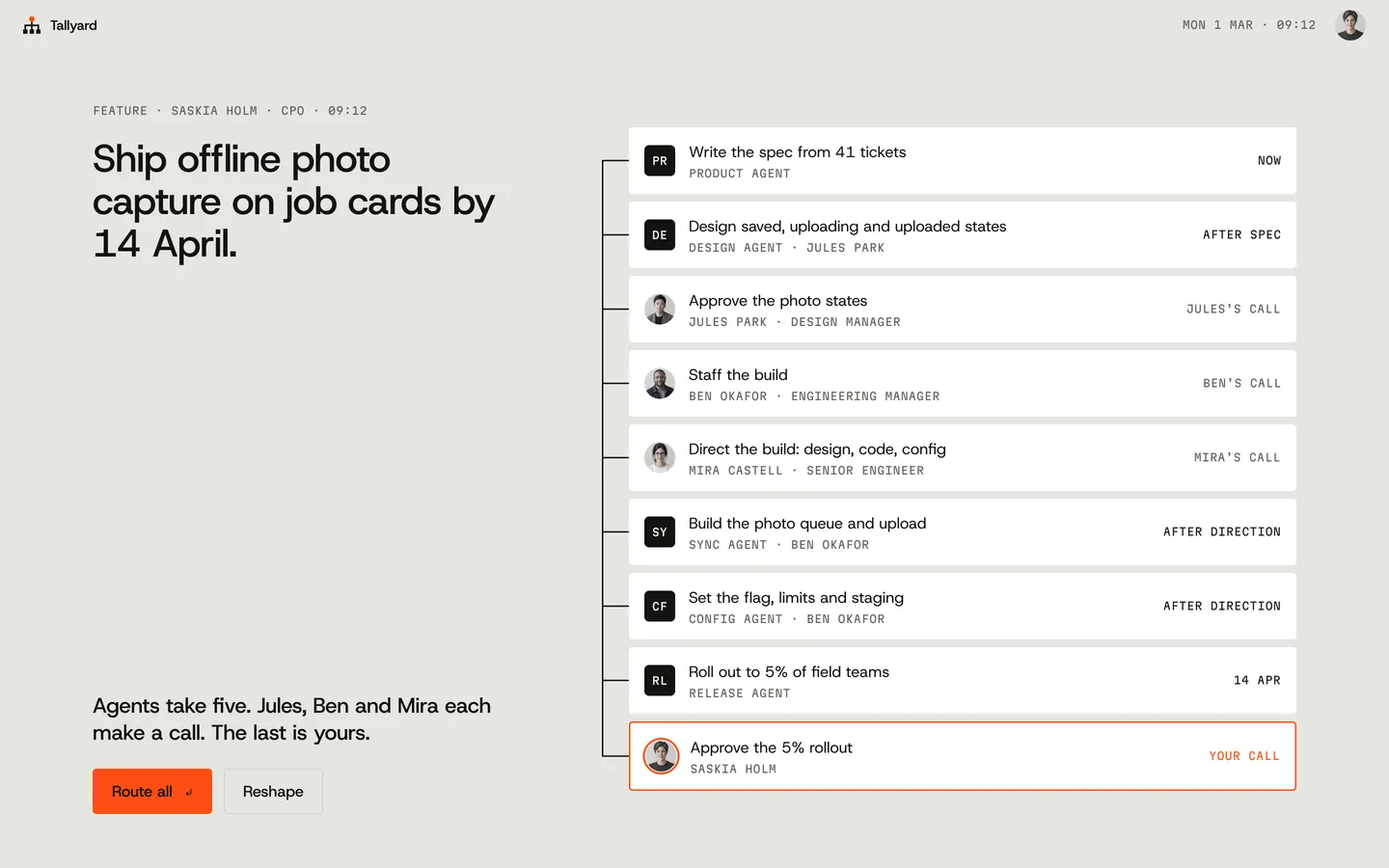
Cluster
It resolves into nine items. Agents take five. Three people each get a call; the last call, approving the rollout, is hers.
03 / 10
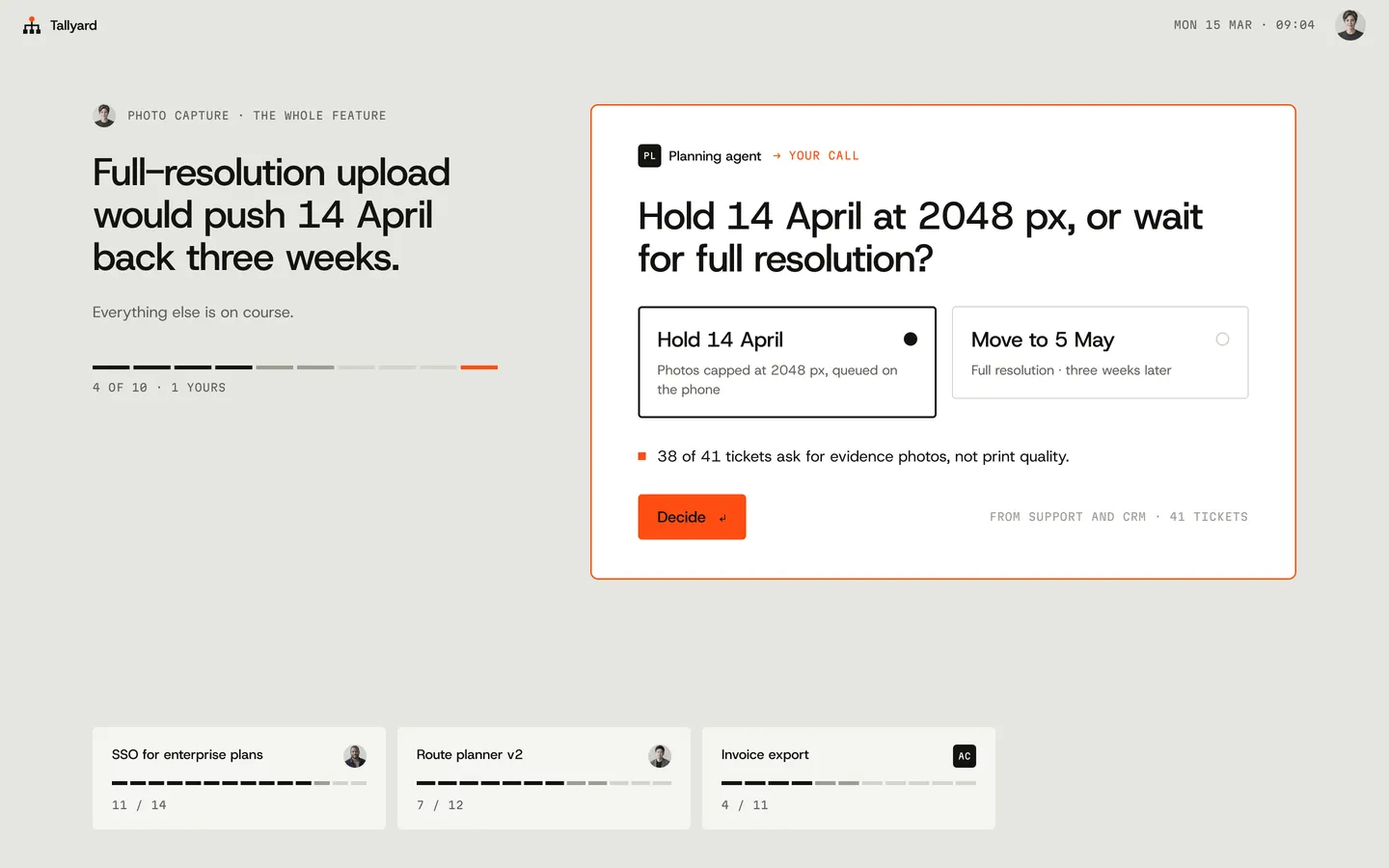
The CPO’s home
Full-resolution upload would cost three weeks. She holds the date at 2048 px, because 38 of 41 tickets ask for evidence photos, not print quality.
04 / 10
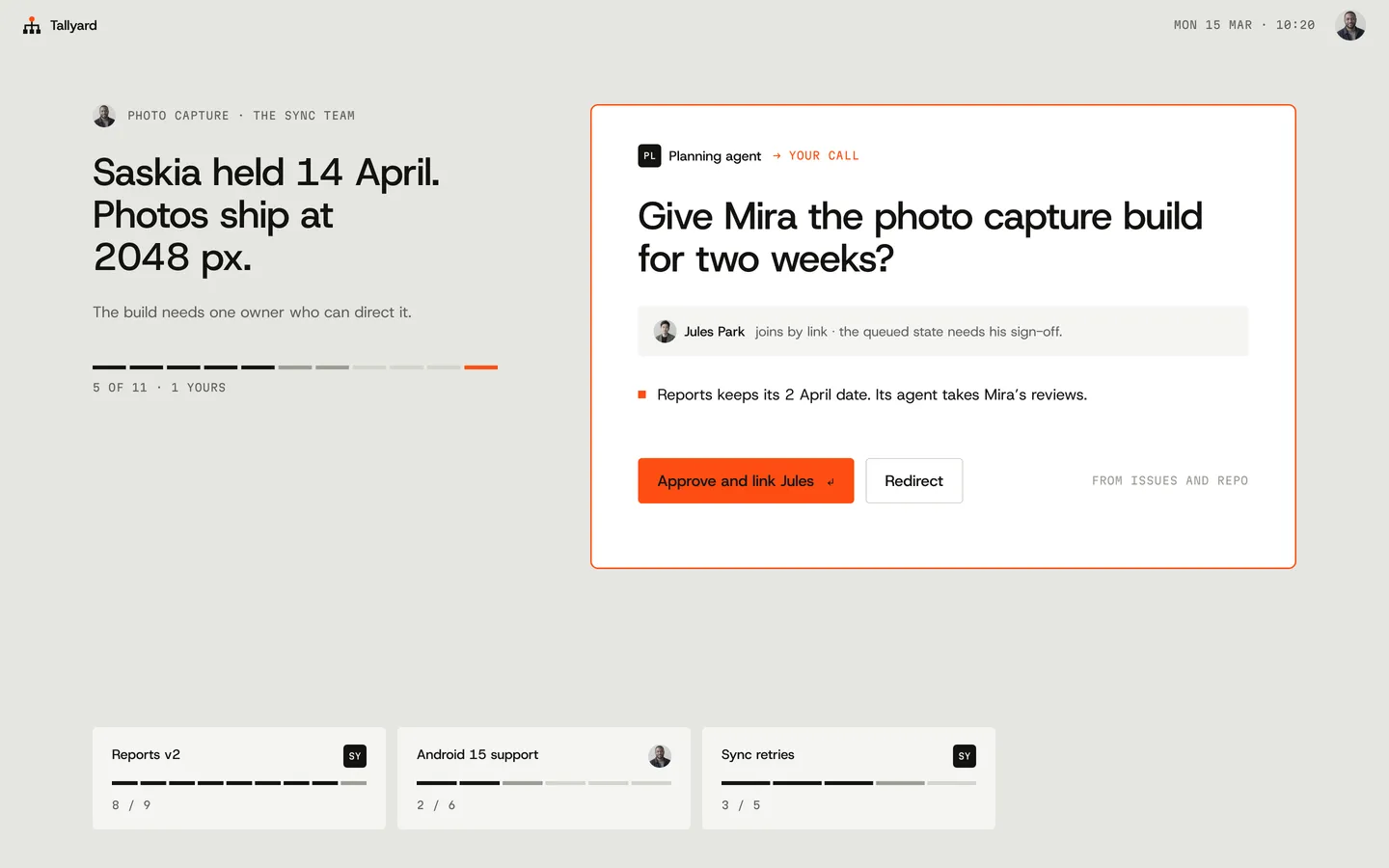
The manager’s home
Ben gives Mira the build for two weeks. Approving it links the design manager, who must sign off the queued state.
05 / 10
The engineer’s home
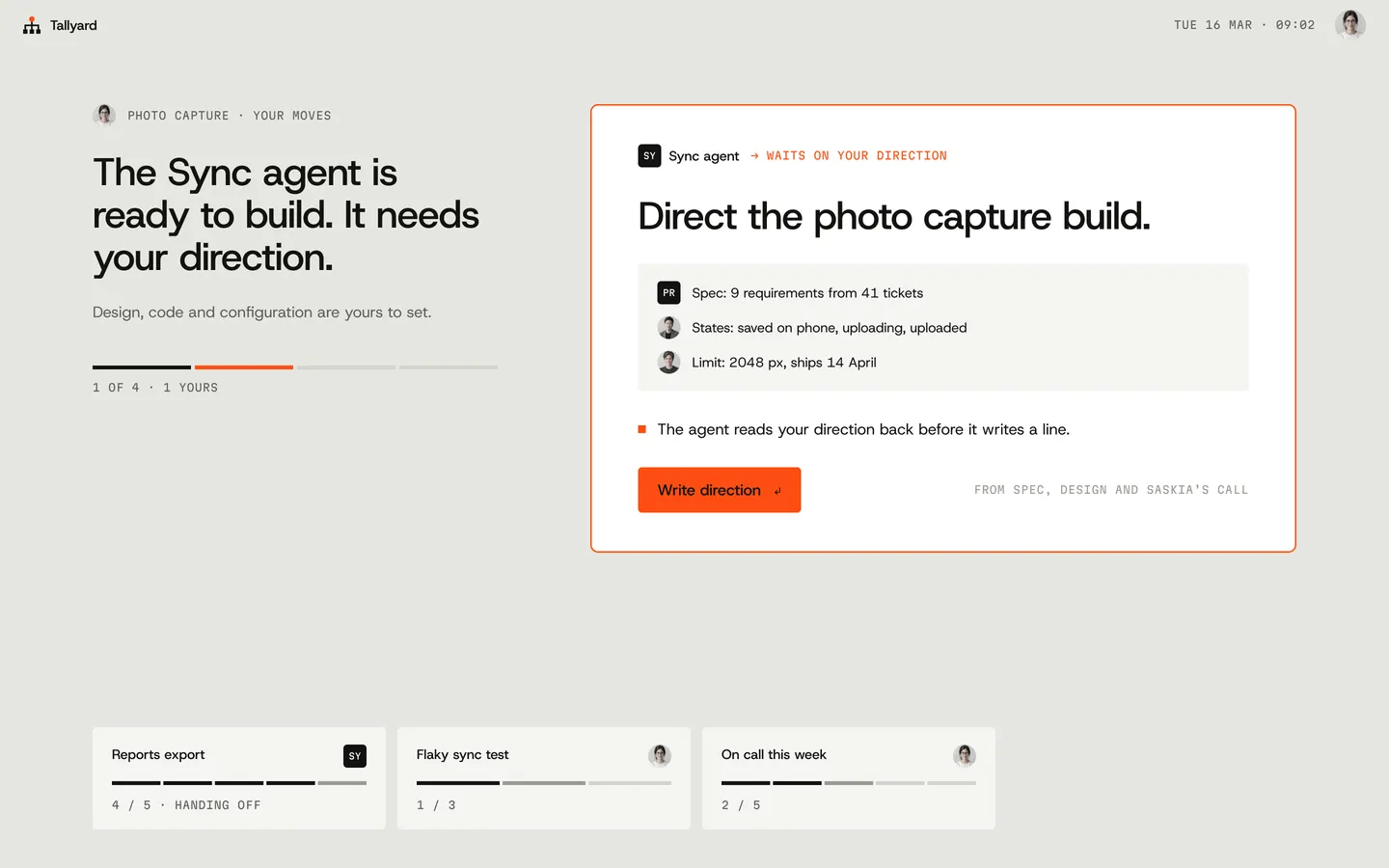
The Sync agent is ready and waits on Mira’s direction. The spec, the design states and the CPO’s limit are already attached.
06 / 10
Direction
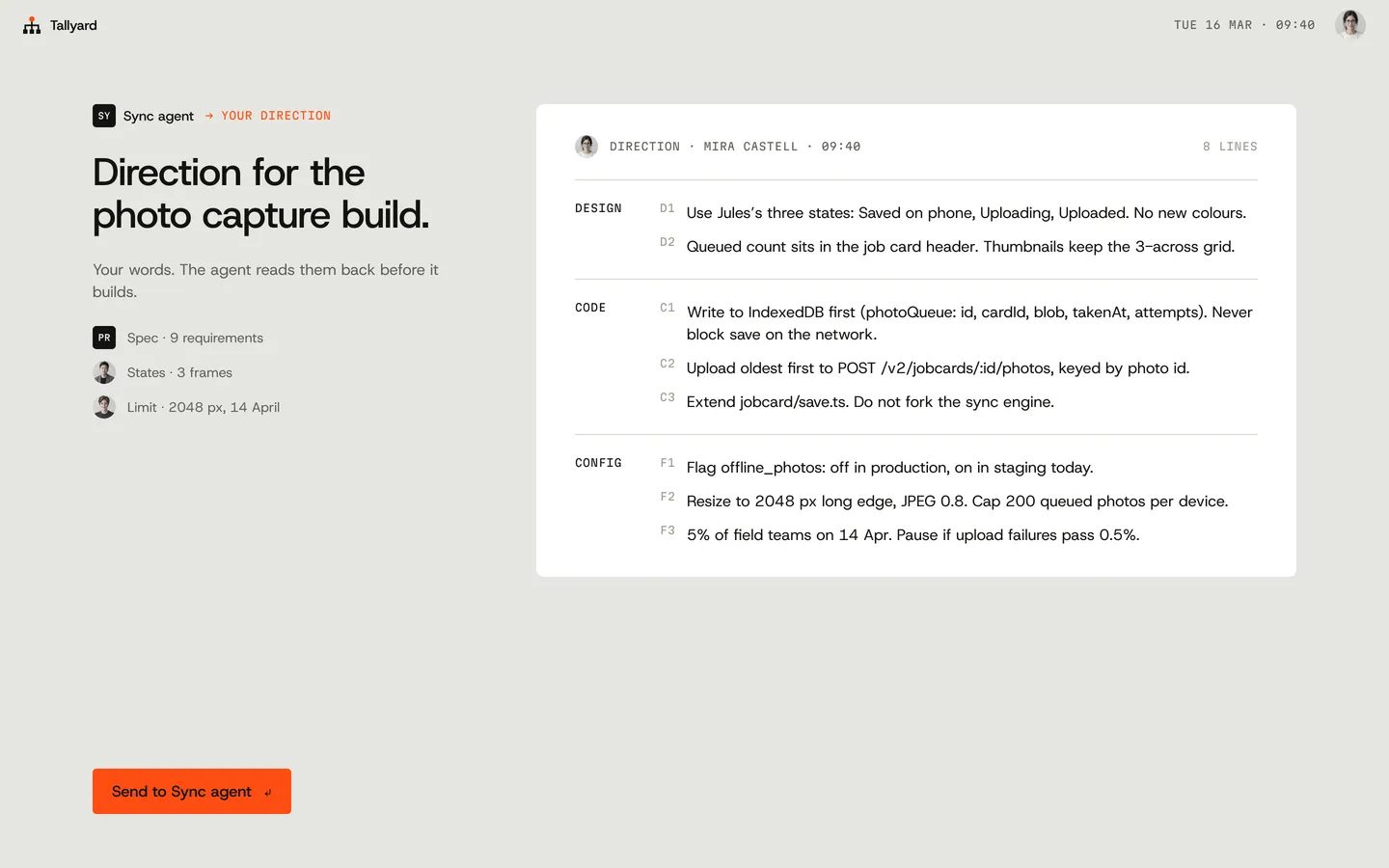
Eight lines in Mira’s own words: two for design, three for code, three for configuration.
07 / 10
Read-back
The agent restates every line. Seven match. On C2 it planned to retry every 30 seconds, which would drain batteries in basements. Mira corrects it in one sentence.
08 / 10
Built to direction
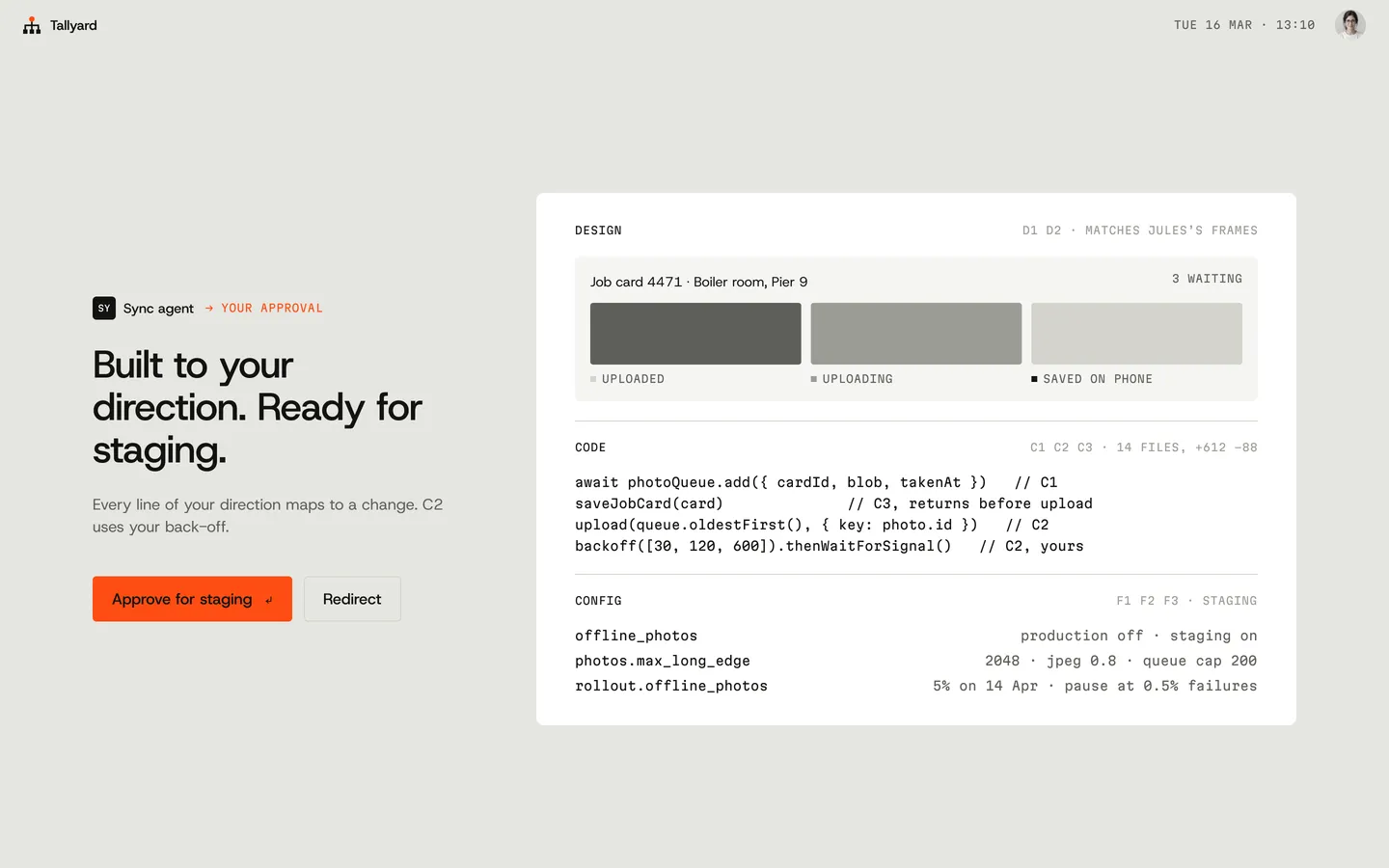
The job card’s three states, the code and the config keys, each citing the line it implements. She approves it for staging.
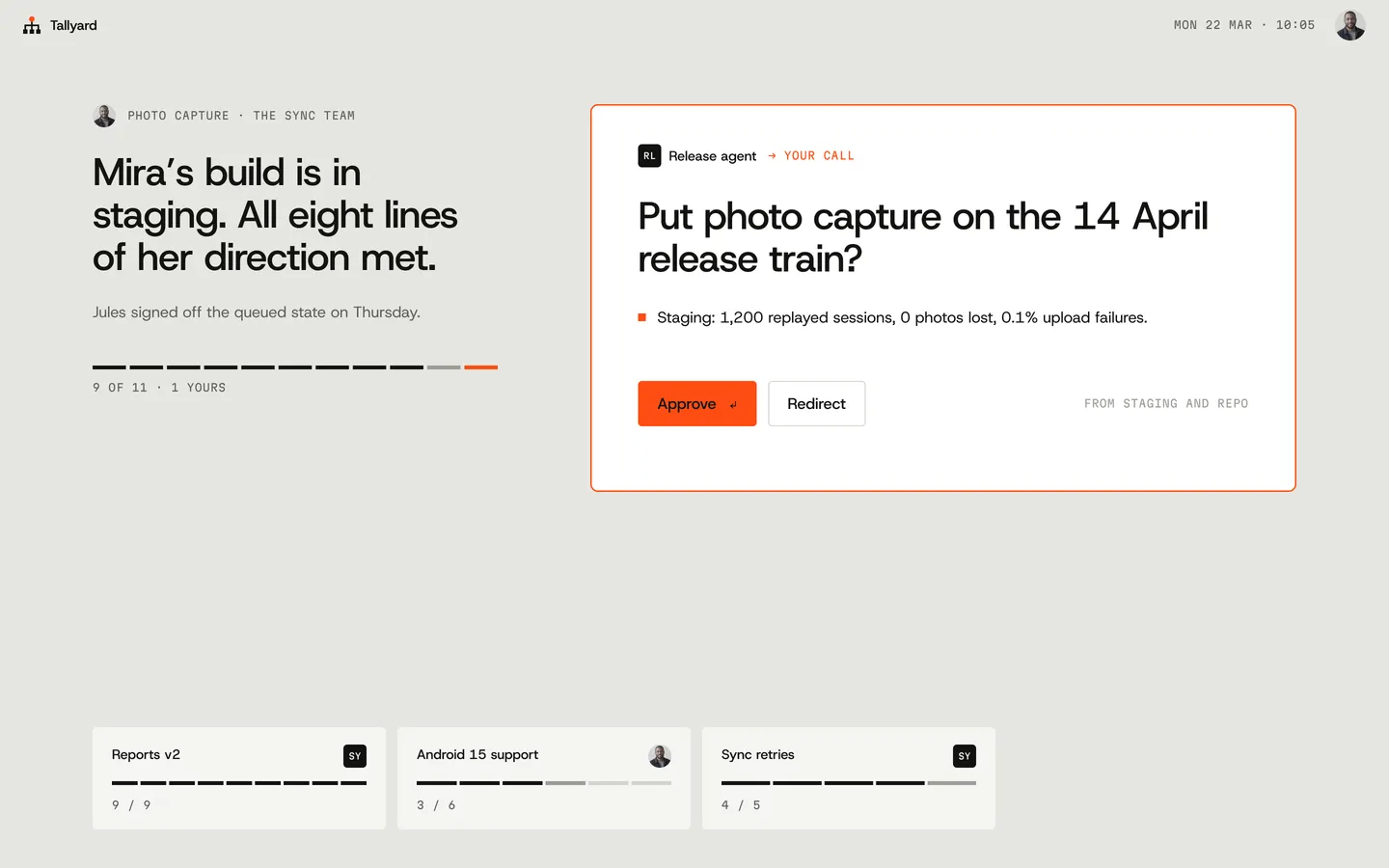
09 / 10
Back to the manager
Ben puts photo capture on the 14 April release train.
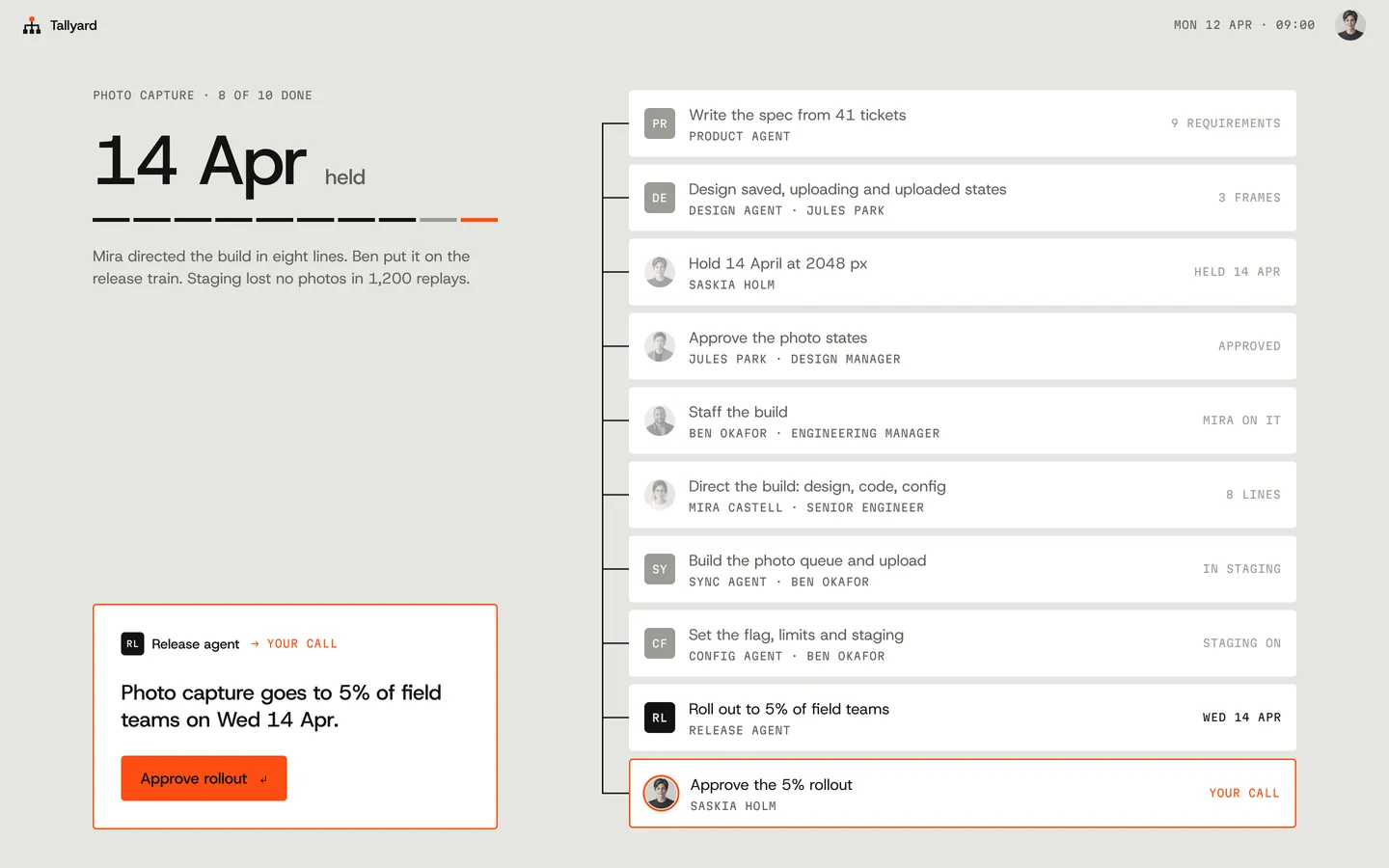
10 / 10
Back to the CPO
Every call answered. Her last call: approve the 5% rollout.


The three homes share one layout so you can read them side by side; what changes is the altitude. And at the bottom of the stack, the engineer neither writes the code nor rubber-stamps it: she says exactly how it must be built, and checks that the agent understood before it starts.
03 / Brand identity
The manners of an operating system, and now, faces.
A calm grey field, ink structure and one vivid colour, Relay, which means exactly one thing: this waits on you.
People have display pictures: invented people, one light, one grey ground, desaturated in the interface so Relay stays the only colour. Agents have avatars of their own: ink squares carrying a two-letter code in Martian Mono (SY for the Sync agent, CF for Config, PL for Planning), legible at 24 pixels. Circles are people, squares are agents. An avatar turns orange only when that role waits on you.
Type is Host Grotesk for what people read and decide, Martian Mono for the system speaking: owners, states, sources, line tags and code. The voice is a good chief of staff: “Full resolution adds three weeks. That is Saskia’s call.”
- Field
- #E6E6E1
- Ink
- #121311
- Relay
- #FF4D12, only what waits on you
- Words
- Host Grotesk
- System voice
- Martian Mono


04 / Design systems
Fifteen components carry the whole OS.
All are Figma components with variants, bound to NU-ORG variables. New this round: Avatar (person or agent; 24, 32 and 48; working, waits on you, done) and DirectionLine (written, matches, check, corrected), the building block of a direction and its read-back.
Tokens cover fourteen colours, seven text styles, a 4-to-96 spacing scale and three radii, plus avatar and direction specs, and the hover and pressed shades a coded build needs.
Components
Rules
- One relay per screen.
- Photo circles for people, coded squares for agents.
- Progress counted in moves, not percent.
- Mono only for the system’s voice.
From NU-ORG OS’s tokens.json, rendered live in its own type
Colour
- ground#E6E6E1Desktop / page background (Field)
- sheet#F5F5F2Held surfaces: dock tiles, panels
- raised#FFFFFFItems, sheets, composer, options
- line#D3D3CCHairlines, quiet button stroke, future progress segments
- ink-3#9A9C95Done glyphs, key hints, running segments
- ink-2#5E605ASecondary text, owners, mono labels
- ink#121311Primary text, routes, glyphs
- ink-inverse#F5F5F2Text on ink
- relay#FF4D12Only what waits on the viewer: calls, primary action, strategy node. Text on relay is ink (contrast ~6:1); never white text on relay.
- relay-tint#FFE4DAReserved tint for relay backgrounds (not used in the core flow)
- relay-hover#F2470FPrimary button hover (ink text ~5.0:1)
- relay-press#E5420CPrimary button pressed (ink text ~4.5:1)
- ink-hover#2B2C29Ink button hover
- ink-press#000000Ink button pressed
Type
- displayHost Grotesk 500 / 72px / 1 / -3%
Say it once.
- titleHost Grotesk 500 / 40px / 1.1 / -2%
Say it once.
- headingHost Grotesk 500 / 22px / 1.25 / -1%
Say it once.
- bodyHost Grotesk 400 / 16px / 1.45
Say it once.
- smallHost Grotesk 400 / 14px / 1.4
Say it once.
- labelMartian Mono 400 / 11px / 1.3 / 4%
C2 · CHECK · 7 OF 8 MATCH
- monoMartian Mono 400 / 13px / 1.4
C2 · CHECK · 7 OF 8 MATCH
Spacing
- 4
- 8
- 12
- 16
- 24
- 32
- 48
- 64
- 96
Radius
- 2px
- 4px
- 8px
- full / full


05 / Development
Direct the agent, built live.
The product’s most original idea: the engineer’s direction, the agent’s read-back and the one correction. Watch the direction type in, send it, fix the one line the agent got wrong (edit the sentence if you like), and see the build cite every line.

Sync agent→ Your direction
Direction for the photo capture build.
Your words. The agent reads them back before it builds.
- Spec · 9 requirements
- States · 3 frames
- Limit · 2048 px, 14 April
 States · 3 frames
 Limit · 2048 px, 14 April
Design
- D1Use Jules’s three states: Saved on phone, Uploading, Uploaded. No new colours.
- D2Queued count sits in the job card header. Thumbnails keep the 3-across grid.
Code
- C1Write to IndexedDB first (photoQueue: id, cardId, blob, takenAt, attempts). Never block save on the network.
- C2Upload oldest first to POST /v2/jobcards/:id/photos, keyed by photo id.
- C3Extend jobcard/save.ts. Do not fork the sync engine.
Config
- F1Flag offline_photos: off in production, on in staging today.
- F2Resize to 2048 px long edge, JPEG 0.8. Cap 200 queued photos per device.
- F35% of field teams on 14 Apr. Pause if upload failures pass 0.5%.
How it is built
- Stack
- One React component and CSS; timers and one animation frame loop, no libraries, no network
- Tokens
- Colours, button states, avatar and direction-line specs from NU-ORG’s tokens.json
- Layout
- Wide: the 1440 by 900 screen scaled to the column with container units. Narrow: the same screen stacked
- Keyboard
- Enter sends; the correction is a real text field and Enter submits it; 2px ink focus ring; each step is announced politely
- Motion
- Reduced motion: no typing or slides; each state complete with a 120ms cross-fade

Talk to us
We love to talk design.
Tell us about your product, the people who use it and where it hurts. We are happy to talk design, user experience and how design can set you up for success.